




Guests want speed and control. A growing share already expects to scan, order, and pay from their phones. According to Menumiz, 78% of customers prefer to place orders via QR code menus. Uniqode also reports that 72% of diners favor venues with QR ordering for convenience and speed. For operators, QR code ordering can translate into faster turns, larger checks, and fewer bottlenecks. This tutorial shows hospitality teams exactly how to set up QR code ordering in 2026. You will plan your digital menu and workflows, choose the right platform, build a mobile-first menu, deploy reliable QR codes, train your staff, go live, and optimize performance. We highlight hospitality-specific tips for restaurants, bars, hotels, food halls, and entertainment venues. We also show how GoTab supports flexible service models with strong integrations and fast guest experiences. Follow the steps to launch with confidence and capture measurable gains in throughput and guest satisfaction.
Key Takeaways
- QR ordering improves throughput. Research highlights 15-25% faster table turnover with QR systems (Restaurant365).
- Guests prefer autonomy. 78% of customers prefer to order via QR menus (Menumiz), and 72% favor venues that offer it (Uniqode).
- Bigger checks are common. Average order value increases by 10-18% with QR ordering (Sunday).
What Is QR Code Ordering in Hospitality?
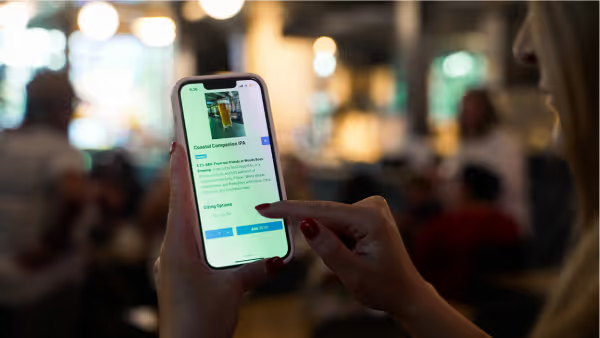
QR code ordering lets guests use their phone camera to scan a code, open a mobile menu, customize items, submit orders, and pay. Orders route to the kitchen or bar, and staff deliver or stage pickup. The guest controls the pace from the first scan to final payment. Compared to a traditional POS flow, QR ordering removes friction. Guests do not wait for menus, servers, or checks. Operators reduce repetitive order taking and payment steps, which frees staff to upsell, run food, and engage where it matters most. According to Menumiz, 78% of customers prefer QR code menus for ordering. Uniqode finds 72% of diners favor venues with QR ordering for speed and convenience. This model extends beyond dining rooms. Hotels use QR codes for room service and poolside orders, which keeps staff focused on delivery and service instead of phone lines and paper tickets. Bars use QR codes during peak times to streamline drink orders and reduce counter congestion. The result is a consistent guest flow across different service models, with clear item customization and instant payment when guests are ready.
Benefits of QR Code Ordering for Restaurants, Bars, and Hotels
Operators adopt QR ordering for measurable wins. Restaurant365 reports that QR ordering increases table turnover by 15-25%. Faster turns lift revenue without expanding seating. Sunday reports average order value rises by 10-18% with QR systems, driven by clear modifiers, add-ons, and suggestive merchandising. These systems also improve guest satisfaction. Guests control timing, pace, and payment. They see live pricing and availability. They can re-order rounds quickly at bars, or split checks without waiting. Teams cut back-and-forth trips to take orders and run credit cards, which reduces labor pressure and error risk. QR ordering also improves accuracy and hygiene. Digital modifiers reduce order confusion, and payments happen on the guest’s device. Operators gain better data on browsing and conversion. That data feeds menu decisions, promotions, and staffing plans.
Expected outcomes
- Faster table or seat turns, supported by 15-25% turnover improvements (Restaurant365).
- Larger checks, supported by 10-18% AOV lifts (Sunday).
- Fewer bottlenecks at bars and counters during peak periods.
- Clearer communication on modifiers and allergen needs.
- Actionable data on item views, add-ons, and order timing.
Step 1: Plan Your Digital Menu and Workflow
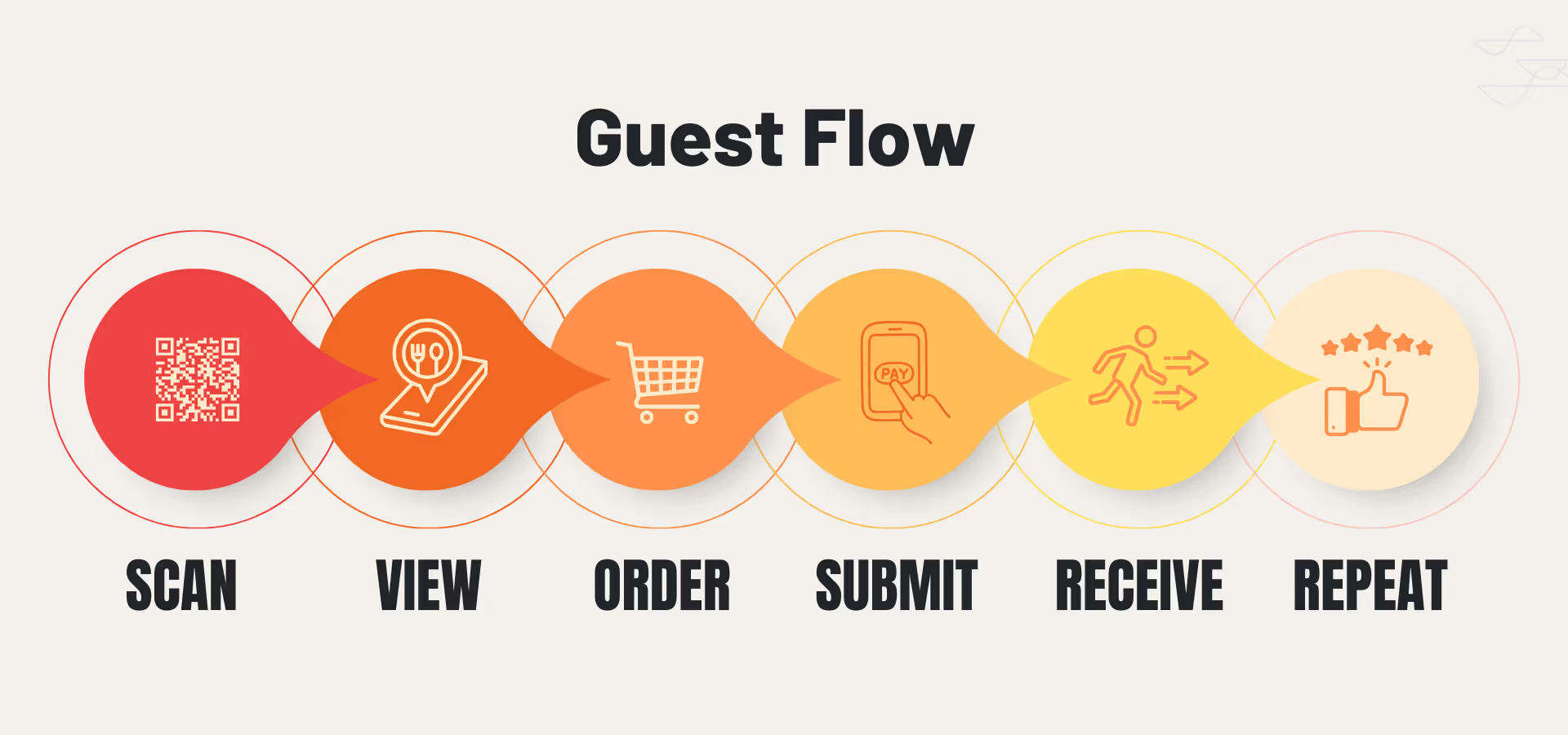
Start with a clear service map. Identify which items are best for self-ordering, which require staff assistance, and which need age verification. Define modifiers, allergens, and recommended upsells. Build your guest journey from the scan to payment and fulfillment. A structured plan avoids confusion. Jamezz notes that many operators map workflows and digital menu structures to identify efficiencies before selecting a platform. Use directional goals if you lack historical data. For example, aim to reduce order-to-fire time in the kitchen and to shorten the time from check request to payment in your dining room. QR ordering also helps with special instructions. Sunday shares an example where a restaurant avoided order confusion by using structured modifiers for dish customization. If guests cannot express preferences cleanly, they will call servers over, which negates the efficiency gains. Keep modifiers precise and limited, link upsells that make sense, and show allergen info clearly.
Prerequisites
- Decide locations for QR ordering: tables, bar seats, lounges, rooms, or pool areas.
- Confirm payment methods and tipping options.
- Prepare item photos, short descriptions, allergen flags, and pricing.
- Set escalation rules for staff intervention.
- Align kitchen and bar printers or screens for QR orders.
Guest flow diagram
Workflow checklist
- Define categories and item availability by daypart.
- Link logical upsells to entrees and drinks.
- Set order throttling or pacing rules for busy periods.
- Decide if orders auto-fire or require approval.
- Map comp/void and refund rules for digital payments.
Step 2: Select the Right QR Code Ordering Platform
Choose a platform that fits hospitality operations. Look at POS integration, menu customization, payment flows, and service features like tabs, coursing, and staff messaging. Evaluate support responsiveness, uptime, and how fast your team can make edits during a rush. According to G2 reviews, operators highlight that GoTab enables flexible ordering workflows and integrates with payment and POS systems. That combination matters for multi-venue operators and complex service models like breweries, food halls, hotels, and entertainment venues.
What to compare
Use this checklist to evaluate vendors for restaurants, bars, hotels, and mixed-use venues.
GoTab capability snapshot
GoTab focuses on flexible, hospitality-first workflows with strong integrations and payment options. Operator feedback on G2 cites flexible order flows and integrations as core strengths.
Fair comparison
When comparing with other providers used by restaurants, bars, and venues, validate the same criteria above. Ask vendors to demo a live edit during a simulated rush, show order throttling, and walk through complex modifiers. Confirm how they handle large events, multi-room operations, and offline contingencies. Document answers so your team can score tradeoffs based on your service model.
Step 3: Build and Design a Mobile-Friendly Menu
Design for phones first. Keep categories short and scannable. Use concise names, brief descriptions, and clear pricing. TorchFi notes that mobile-optimized menus with high-resolution images and easy navigation enhance customer experience. Their guidance also highlights that menu items with images can see 15-25% higher orders. Use images that match what the kitchen will serve and compress them for speed. Add allergen information and warnings where needed. Use plain language for modifiers. Group upsells that complement the base item. For example, pair premium toppings with pizzas, add fries to sandwiches, or offer spirit upgrades on cocktails. Keep options relevant and limited so guests do not stall. Make it fast. Aim for minimal taps from category to checkout. Use sensible defaults for quantities and sizes. Place best sellers and profitable items near the top of each category. Add a short banner for promos that rotate by daypart or event.
Accessibility essentials
- High-contrast text and large tap targets.
- Alt text for images where supported.
- Clear allergen icons with text labels.
- Avoid long blocks of all caps or tiny fonts.
- Support keyboard navigation on web menus where possible.
GoTab setup tips
- Keep categories lean and logical.
- Use images for top movers and signature items.
- Attach upsells directly to high-margin dishes.
- Use short, readable modifier groups.
- Preview the menu on multiple phone sizes.
Step 4: Generate, Print, and Deploy QR Codes
Create stable, scannable codes and place them where guests can reach them. Use unique codes per table, seat, room, or pool area so you can route orders and track performance by location. Use dynamic QR codes if you want the flexibility to update destinations without reprinting. Print on durable materials suited to your venue, like waterproof table tents for patios or coasters for bars. Keep adequate white space around the code. Avoid glossy finishes under bright lights that cause glare.
Testing checklist
- Test scans with iOS and Android default cameras.
- Verify the code opens to the correct location and menu.
- Place codes at natural reach and sight lines.
- Validate orders route to the right KDS or printer.
- Stress test Wi-Fi and cell fallback at peak times.
Placement tips by venue
- Restaurants: at each table, plus host stand for walk-ins.
- Bars: at high-tops.
- Hotels: in-room tent, TV card, poolside chairs.
- Food halls: table clusters, vendor stalls, entry signage.
- Entertainment venues: seatbacks, lounges, concourses.
Step 5: Staff Training and Customer Education
Train teams to guide guests and to troubleshoot quickly. Show staff how to place a test order, comp or void when needed, and escalate to server ordering if a device or network fails. Role-play peaks so everyone knows their station and scripts. Post clear instructions near every code. Keep it simple: Scan, order, relax. Add notes on split checks, re-orders, and tip options. Use bilingual signage where appropriate. Provide a small card for guests who prefer to order with staff. Bars and high-volume counters benefit most when staff can focus on pours and handoffs instead of tapping orders. During peaks, assign a floater to help new guests scan and answer quick questions.
Suggested staff scripts
- Welcome: "You can scan to order anytime. If you prefer, I can take your order too."
- Upsell: "Scan and tap Cocktails. Our house margarita has a premium tequila upgrade."
- Payment: "You can pay on your phone now or keep the tab open for another round."
- Recovery: "If the code is not loading, I will place the order here and get it started."
- Accessibility: "If the font is hard to read, I can read the menu for you."
GoTab resources
- Menu and signage templates for quick printing.
- Quick-start training guides for front- and back-of-house.
- Recommended device settings and network tips.
- Shift checklists for pre-open testing.
Step 6: Go Live and Monitor Performance
Set clear metrics before launch. Track adoption rate, time from scan to order, fulfillment time by station, and average check size. Restaurant365 reports QR systems can improve table turnover by 15-25%. Sunday reports 10-18% gains in average order value. Use these directional benchmarks to gauge early traction, then optimize your flow. Use your platform dashboard to watch hourly trends. Watch re-order patterns at bars. If guests stall on modifiers, simplify them. If fulfillment lags, reassign runners during peaks.
GoTab analytics tips
- Monitor category conversion and drop-off.
- Compare item views vs adds to cart.
- Test upsell placements on high-traffic items.
- Review heatmaps by table or location if available.
- Export reports weekly to spot trends by daypart.
Troubleshooting and Overcoming Common Challenges
Anticipate the most common issues and document fast fixes. Have a manual order fallback and a simple recovery policy so staff can act without delays.
Driving customer adoption
- Greet and offer QR ordering as an option, not a mandate.
- Use clear, friendly table tents with three-step instructions.
- Promote a featured item or small discount for first-time QR orders if allowed.
- Place staff floaters to assist during the first weeks.
- Rotate a signature dish featured image at the top of the menu.
Handling tech issues and connectivity
- Set up a stable guest Wi-Fi and test LTE fallback areas.
- Use high error correction QR codes to maintain scan reliability on worn surfaces.
- Keep printed backup menus and a handheld device per section.
- If the KDS stalls, print to backup and reconcile when back online.
Security and privacy best practices
- Use PCI-compliant payment processors and tokenization.
- Limit staff access by role, log all comp/void activity.
- Post a short privacy notice linking to full policy.
- Avoid storing card data locally.
- Update software and revoke stale user accounts promptly.
Advanced Optimization and Integrations
Once stable, layer in programs that drive loyalty and higher margins. Use targeted prompts and feedback loops to refine the menu and experience over time.
Loyalty and marketing
- Connect loyalty so guests earn automatically when paying.
- Trigger bounce-back offers after payment for quiet dayparts.
- Use event-based menus for game days, concerts, or holidays.
- Build pre-order flows for large parties or poolside cabanas.
Menu intelligence and upsell prompts
- Show add-ons that make sense for each item.
- Promote profitable swaps like premium spirits.
- A/B test images and descriptions on top sellers.
- Highlight dietary tags like gluten-free or vegan.
Guest feedback
- Ask for a 10-second rating after payment.
- Route low scores to a manager for same-shift recovery.
- Post weekly summaries so chefs and bartenders see trends.
- Use feedback to prune low performers and elevate winners.
Why Choose GoTab for QR Code Ordering in Hospitality?
GoTab focuses on hospitality-first ordering and payment. Operators need a platform that handles flexible workflows, integrates cleanly, and keeps menus easy to manage during a rush. According to G2 reviews, GoTab enables flexible order flows and integrates with POS and payment systems, which supports complex venues like breweries, hotels, and food halls. GoTab’s approach aligns to four priorities: seamless ordering and payment on the guest’s device, operational efficiency through comprehensive management tools, improved guest satisfaction with flexible ordering options, and scalable solutions tailored to restaurants, bars, hotels, and entertainment venues.
What you get
- Flexible QR ordering: at-table, bar seats, room service, poolside.
- Fast menu control: quick edits, categories, modifiers, images.
- Integrated payments: support for modern wallets and tipping.
- Strong routing: send orders to the right KDS or printer.
- Real-time support and training resources for smooth launches.
Next step
Schedule a short demo. Bring your menu and service map. We will show how to configure workflows for your venue, deploy durable QR codes, and set up dashboards to track adoption, speed, and average check from day one.
FAQs: QR Code Ordering in Hospitality
How do I implement QR code ordering for my venue?
Plan your digital menu and workflows, select a platform like GoTab with strong integrations, build a mobile-first menu, deploy QR codes, train staff, then monitor and optimize. Restaurant365 and Sunday report gains in turnover and AOV with QR.
Will guests use it?
Yes, many will. Menumiz reports 78% prefer QR menu ordering. Uniqode finds 72% favor venues that provide it for convenience.
How fast can we launch?
Most venues can go live in a few weeks. Start with one service area, validate flows, then roll out.
What results should I expect?
Directionally, operators report faster turns and higher average checks. Restaurant365 cites 15-25% faster turnover. Sunday cites 10-18% higher AOV.
How do I handle guests who prefer staff ordering?
Offer both. Post friendly instructions and let staff take orders on request. Keep a handheld device as a backup.
Is it secure?
Use PCI-compliant processors, tokenized payments, role-based access, and clear privacy notices. Update credentials and apps regularly.
Does it work for bars and hotels?
Yes. Bars speed up rounds with seat-level QR codes. Hotels use in-room and poolside QR codes for convenient service.
Conclusion
QR code ordering is now a core service channel, not a novelty. The data points to meaningful gains: faster turns and larger checks when you design the right menu, deploy reliable codes, and train staff to guide guests. Many diners prefer the control and speed of scanning, ordering, and paying on their own device. Follow the steps in this guide to plan workflows, select a platform, design a mobile-first menu, deploy durable codes, and monitor performance. Use the insights from your dashboard to simplify modifiers, refine upsells, and route staff to the bottlenecks that matter. If you want a hospitality-first platform with flexible workflows and proven integrations, schedule a GoTab demo. We will help you configure a pilot and track results from day one.
References
- QR Code Ordering for Restaurants: The 2025 Dining Shift
- Restaurant QR Code Usage Study
- 12 Efficiency and Profitability Benefits of QR Code Menus
- The Importance of QR Code Ordering in the Digital Transformation of Restaurants
- QR Code Use Cases in the Hospitality Industry
- GoTab Reviews
- How Restaurants Use Table Tent QR Codes
- How to Offer QR Code Menus: 20 Best Practices for Restaurants
- QR Ordering Restaurant Guide
- QR Code Ordering: From Trend to Standard in 2025