




And Why the Kind of KDS Matters
For decades, kitchen printers did their job. They printed tickets, the kitchen cooked, and food went out.
But service has changed — and printers haven’t.
Today’s guests don’t order once and disappear. They order from QR codes, add items later, grab drinks from the bar, and still expect everything to arrive together. As a result, kitchens aren’t just making food anymore — they’re managing timing.
That’s why more restaurants are replacing printers with kitchen display systems (KDS). But here’s the catch:
Not all KDS platforms solve the same problem.
The Starting Point: A Screen Instead of a Printer
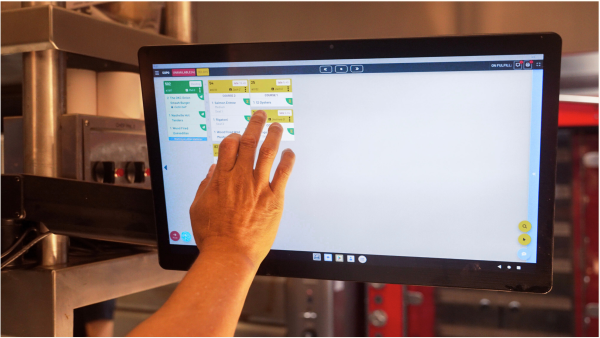
At the most basic level, a KDS replaces paper with a screen. Orders are easier to read. Tickets don’t get lost. Staff can tap items completed instead of ripping paper off a rail. For many kitchens, especially those that provide counter service, this alone is a big improvement.
This is where systems like Square fit well. They clean up the chaos of printers and make orders visible in real time.
But while visibility improves, the kitchen still works order by order. If a guest orders again later, that’s a new ticket. Timing and coordination are still handled entirely by people.
The Necessary Step Up: Better Flow for Traditional Restaurants
Most operators expect more from a KDS than just digital tickets. Systems like Toast take things further by supporting prep screens, expo views, and open tabs. Servers can add items throughout a meal, and the kitchen sees orders immediately when they’re fired.
This makes a noticeable difference in traditional full-service restaurants. Kitchens feel more organized. Service flows faster. Expo has better control during busy periods.
But under the hood, the kitchen is still working ticket by ticket. When guests add items later, those orders arrive separately. Making sure food finishes together still depends on staff communication and experience.
What a KDS Needs to Be Today
Modern service isn’t just about speed — it’s about coordination, consistency, and clarity.
This is where platforms like GoTab take a different approach.
GoTab starts with a simple assumption: guests don’t order once anymore — and kitchens can’t rely on memory alone.
Instead of treating every order as a separate ticket, GoTab advanced kitchen display system connects orders placed over time into a single kitchen workflow. Orders from QR codes, servers, the bar, or even multiple vendors all come together with shared context.
That allows the system to group related orders, pace courses naturally, and help the kitchen decide what should be made now and what should wait so food finishes together.
GoTab also extends beyond timing and into execution consistency. Recipes, build cards, and training information can live directly on the KDS. That means cooks aren’t guessing, new staff aren’t relying on memory, and standards don’t disappear during a rush.
Together, this reduces mistakes, shortens training time, and lowers the mental load on staff during peak periods.
So Why Replace Printers at All?
Printers only answer one question: What was ordered?
A modern KDS needs to answer better ones:
- What’s coming next?
- What needs to be made now?
- What should wait?
- How should this be built?
- How do we make this all land together?
The Simple Takeaway
If your kitchen is simple, replacing printers with a basic KDS might be enough.
But there’s also a very practical benefit: cost. A case of printer paper typically costs around $60. Even small operations can easily go through 10 or more cases per year, putting paper costs alone at roughly $600 annually. Larger, busier operations often spend well over $2,000 a year just on paper — before factoring in printer maintenance and downtime.
When guests order more than once, from more than one place — and you care about speed, consistency, and training — the real value of a KDS isn’t just paperless tickets.
It’s how much thinking the system takes off your team’s plate. That’s why the kind of KDS you choose matters more than ever.
The Bottom Line: Choose a KDS Built for How Kitchens Actually Work Now
Replacing printers with a Kitchen Display System (KDS) is no longer a question of if — it’s a question of which kind. Basic KDS tools solve the visibility problem by turning paper tickets into screens. But today’s kitchens need more than visibility. They need coordination.
An advanced KDS goes beyond showing what was ordered. It understands how guests order over time, how items should be paced, and how food needs to land together — even when orders come from QR codes, servers, bars, or multiple concepts. It reduces reliance on memory, smooths handoffs between stations, and gives teams clear direction during the busiest moments.
As service models continue to evolve, the role of the Kitchen Display System will only become more central to kitchen performance. The right KDS doesn’t just replace printers — it replaces guesswork, reduces training friction, and helps kitchens deliver consistent results at scale.
In the end, the best advanced KDS is the one designed for modern ordering behavior, not yesterday’s ticket rail. That’s what makes the difference between simply going paperless and truly running a smarter, calmer, more coordinated kitchen.